
Compare automation platforms with one representative workflow and the vendor's current billing rules. Count successful actions or module credits, include retries and operating labor, and test failure handling. For regulated data, review contracts, transfer mechanisms, security controls, retention, and vendor responsibilities with qualified legal and security teams.
- Count the billable unit for the workflow you will run. Zapier counts successful actions, Make counts module actions as credits, and n8n Cloud counts workflow executions.
- Self-hosted n8n removes a vendor execution fee, but infrastructure, maintenance, support, security, and license limits remain part of the cost.
- Use approval and exception paths for consequential actions, then test what happens when inputs are incomplete, services fail, or an approver rejects the action.
- Compliance depends on the data, purpose, contracts, transfer mechanism, configuration, safeguards, and operating process. A hosting option cannot establish compliance by itself.
What Are the Best AI Tools for Business Automation by Category?

Business automation uses software to run recurring work, move data, and route exceptions. The useful categories are workflow orchestration, agent builders, sales and marketing tools, customer support systems, and robotic process automation for interfaces without usable APIs.
Choose with a representative workflow. List its integrations, successful actions, data volume, permissions, error paths, support needs, and recovery requirements. Then price that workload using the vendor's current rules.
Entry prices and integration counts say little about the cost of a production workflow.
Zapier and Make suit teams that want managed visual builders. n8n offers a managed service and a source-available self-hosted edition for teams prepared to operate it. UiPath and similar RPA products address desktop and legacy interface automation.
Agent builders from Microsoft and other vendors can add model-driven decisions, but each action still needs bounded permissions and observable outcomes.
| Category | Examples | Main question |
|---|---|---|
| Workflow orchestration | Zapier, Make, n8n | How is each successful run billed and recovered after failure? |
| Agent builders | Microsoft Copilot Studio, vendor agent tools | Which tools and records can the agent access? |
| Sales and marketing | CRM-native automation, journey tools | Can the system read and write the required fields safely? |
| Customer support | Knowledge-grounded support agents | How are unsupported answers detected and escalated? |
| Enterprise RPA | UiPath and comparable suites | Does the workflow require a user interface instead of an API? |
Self-hosting can remove a vendor execution fee, but it does not create infinite capacity. Throughput still depends on compute, database performance, queue design, upstream rate limits, and the team maintaining the service.
The Uncommon Insight: How Per-Task Billing Erodes Automation ROI at Scale
Billing units differ, so compare units before comparing prices. According to Zapier's task documentation, successful action steps count as tasks. Triggers, Filters, Paths, Formatter steps, failed steps, and steps that do not run do not count. Some Zapier products use separate rates.
Make's pricing page states that each module action, such as fetching data or adding a row, counts as one credit. n8n Cloud meters workflow executions, while the self-hosted Community Edition has no per-execution software fee for permitted use. Self-hosting still carries infrastructure and operating costs.
Consider 100,000 completed workflow runs in a month. If each run performs two billable Zapier actions, the workload uses 200,000 Zapier tasks. If the comparable Make scenario performs three module actions, it uses 300,000 Make credits.
An n8n Cloud workflow would normally be measured as 100,000 executions. These are usage units, not price quotes. Apply the live plan, overage, retry, and product-specific rules on 21 September 2026 before buying.
| Platform | Unit to model | Include in the estimate |
|---|---|---|
| Zapier | Successful billable actions | Replays, error-handler actions, product-specific task rates, and overages |
| Make | Module-action credits | Iterators, bundles, code execution, extra credits, and data transfer |
| n8n Cloud | Workflow executions | Plan limits, concurrency, retention, and support |
| n8n self-hosted | Infrastructure usage | Compute, database, backups, upgrades, monitoring, and engineering time |
Zapier Task Volume Calculator
Estimate task volume from completed runs and billable successful actions. Apply Zapier's current plan price separately.
Step 1: Match AI Agent Builders to Specific Business Departments

Start with the department's actual records and actions. Sales may need CRM context and controlled write-back. Marketing may need campaign briefs and approval before publication.
Support may need retrieval from approved documentation plus an escalation path. Operations may need cross-system reconciliation with a durable audit trail.
| Department | Example workflow | Selection test |
|---|---|---|
| Sales | Enrich and route a lead | Can the tool update only the approved CRM fields? |
| Marketing | Draft campaign assets | Can a reviewer approve the asset before it is published? |
| Support | Answer from a knowledge base | Does evaluation catch unsupported answers and route uncertainty? |
| Operations | Reconcile records | Are retries idempotent and exceptions visible? |
Restricting a support agent to approved material can reduce unsupported answers, but it does not prevent hallucinations. Test the system against missing, conflicting, stale, and adversarial content. Track correction rate, escalation rate, response time, and operating cost on a pilot that reflects real traffic.
Step 2: Build Human-in-the-Loop Gates Without Writing Code
Approval gates reduce the chance that a consequential action executes without review. Legal compliance and correctness still depend on the surrounding process, including suitable access controls, evidence, retention, training, incident handling, and review by the responsible legal and security teams.
Use the platform's native approval step where it meets the requirement. A typical flow holds the proposed action, sends the reviewer the relevant context, records approval or rejection, and executes only an approved action. Add a timeout, a named owner, and a path for an unavailable approver.
- Trigger the workflow and validate required input.
- Draft the proposed action without executing it.
- Store the draft in a pending state and notify the approver.
- Record the approver, decision, timestamp, and relevant evidence.
- Execute an approved action once, or close and log a rejected action.
Building with AI models? AIGROW API credit runs Claude, GPT and Grok models up to 75% below list price.
Step 3: Transition From No-Code to Developer-Centric Infrastructure

The best AI tools for business automation include these native approval nodes to secure your operations. No-code platforms get you to market fast. They also hit a ceiling.
When your workflows require complex data transformations, custom API authentication, or memory-equipped agents, you must transition to developer-centric infrastructure.
The best AI tools for business automation scale with your technical maturity. Standard trigger-action workflows follow a linear path: if this happens, do that. Agentic workflows are different. The AI model receives a goal, decides which tools to use, executes the steps, and evaluates the output.
This requires RAG pipelines and memory management. n8n's native LangChain integration supports RAG pipelines, multi-model agent workflows, memory-equipped agents, and MCP integration, making it the execution-layer tool of choice for AI-heavy workloads.
If your team writes Python or TypeScript, transitioning from Make to n8n is the logical next step. Use this decision framework to determine your transition point: - You process over 250,000 executions per month. - You need to manage vector databases for RAG.
- Your workflows require custom error handling and retry logic.
- You need to pass complex context between AI steps. When you hit three of these four triggers, hosted platforms become a liability. The pricing scales linearly with volume, but your features do not improve.
Developer-centric platforms like n8n allow you to deploy custom nodes, integrate claude code for script generation, and maintain a local vector store for your provider data.
agent_config:
 model: "claude-opus-5-5"
 tools:
 - "video_transcriber"
 - "metadata_extractor"
 memory:
 type: "buffer"
 session_key: "user_123"
Here is a code snippet demonstrating how an agentic workflow routes a video processing request via a custom node. Transitioning infrastructure is a critical inflection point. Do it too early, and you waste engineering resources on basic tasks.
How Do You Achieve Data Sovereignty and Compliance?
Data residency, data sovereignty, GDPR, and HIPAA describe different requirements. A system can keep data in one region and still fail other legal or security duties. A hosted service can also be lawful when the organization has the correct contracts, transfer mechanism, configuration, safeguards, and operating process.
For transfers of personal data outside the European Economic Area, review the available mechanisms in the European Commission's guidance on international data transfers. A transfer to the United States is not automatically unlawful. The organization must identify the transfer, choose an applicable mechanism, assess the circumstances, and add safeguards where required.
For electronic protected health information, HHS guidance on cloud computing allows covered entities and business associates to use cloud services when they execute an appropriate business associate agreement and meet the applicable HIPAA requirements. Self-hosting does not establish HIPAA compliance by itself.
Evaluate each candidate against a written data-flow map:
- Identify the data, purpose, controller, processors, sub-processors, and destinations.
- Check the DPA, BAA where applicable, transfer mechanism, retention terms, deletion process, and incident duties.
- Verify region selection, backups, support access, telemetry, failover routing, and every external API called by the workflow.
- Apply least privilege, encryption suited to the risk, audit logging, key management, recovery tests, and access review.
- Obtain legal and security review for the actual deployment.
n8n self-hosting and on-premises RPA can provide more control over where workflow data is stored and processed. They also make the operator responsible for hardening, upgrades, backups, monitoring, and every configured egress.
When Should You Use RPA Over API-Based Automation?
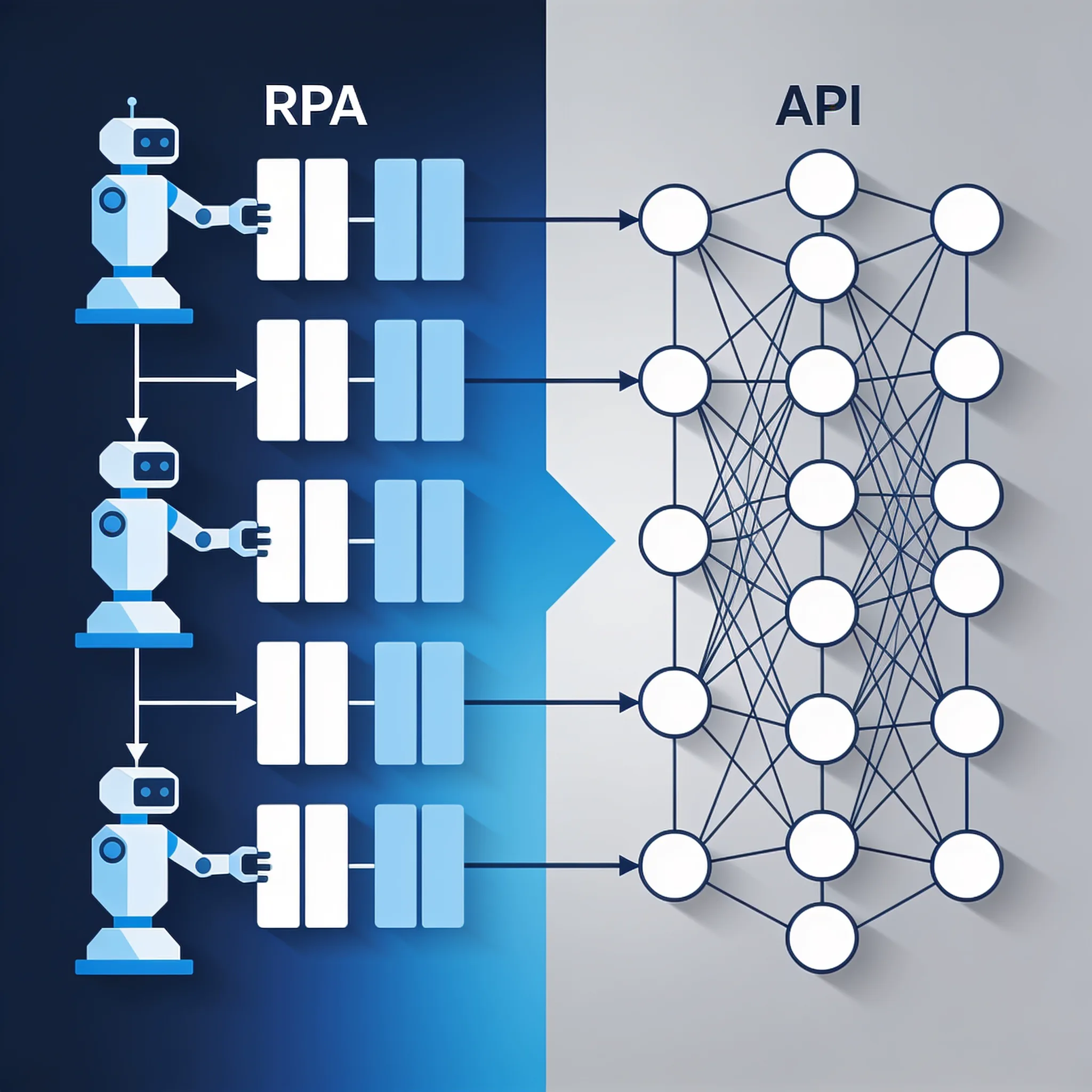
Use RPA when a necessary system lacks a suitable API and the workflow must interact with its user interface. Mainframes, local enterprise applications, and third-party portals can fit this case. Prefer an API when it provides the required operation because APIs usually expose clearer contracts, permissions, errors, and idempotency controls.
RPA carries interface risk. A label, screen layout, session timeout, or authentication step can change without warning. Record the expected state, detect unexpected screens, cap retries, and route failures to a named owner.
For sensitive data, assess the whole deployment rather than treating self-hosting as an automatic requirement or compliance result.
Platforms increasingly combine API orchestration and UI automation. Test both modes against the systems you actually use, then compare maintenance effort, observability, recovery, and vendor support. A browser bot may be justified for one legacy step while the rest of the process stays on APIs.
The newest Claude, GPT and Grok models, up to 75% below list price
One API key for Claude, GPT and Grok models. It works with the OpenAI and Anthropic SDKs and with Claude Code.
Each model’s rate through AIGROW credit sits beside its maker’s list price, never above it.
Frequently Asked Questions
